ONLINE Time management training

more job satisfaction, less stress, and better results?

Discover the online time management training that actually works and master your Monday!

time management training from behind your laptop!
StarStarStarStarStar
"Truly very valuable in these hectic times."
Pauline van der Linden - PostNL

WHAT does the ONLINE TIME MANAGEMENT training look like in PRACTICE?

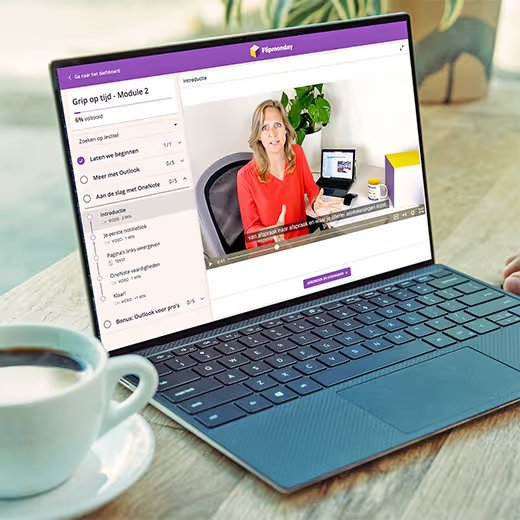
The training consists of 2 online learning modules (self-study) and 2 online live sessions with a trainer. You will complete the training over a 4-week period, dedicating 1 to 1.5 hours each week. This makes it easy to fit into your schedule and provides enough time to adopt new habits, as that certainly can't be done in a single day.

Starter kit
Start email and training materials
You will receive a start email with all the information you need to get going, and you will get access to our digital learning environment. In addition, you will receive our training materials by mail: a handy tool that helps you adopt a new, smart way of working.
Online learning module on time management and Outlook
Online learning module 1
You will complete an online video module (approx. 45 min) on the basic principles of time management, and learn how to configure and use Outlook to work smarter and faster.
Live session on time management and Outlook
Live session 1
In a live session with a trainer (online, 1.5 hours), you will learn a foolproof system for your email, calendar, and tasks based on Microsoft Outlook.
Get started with your Outlook inbox yourself
Getting started yourself
After the first live session, you will start working with your system yourself and process your emails. You can contact the trainer if you have any questions.
Online learning module on OneNote
Online learning module 2
You will complete a second online video module (approx. 30 min) with further in-depth coverage of Outlook and an introduction to OneNote.
Live session on OneNote
Live session 2
In a second live session with a trainer (online, 1.5 hours), there is time for questions and sharing experiences; you will optimize your system and get started with OneNote.
Handy desk cube
Explanation of Outlook settings
Learn time management online
Self-paced online learning modules

WHAT OTHERS SAY

StarStarStarStarStar
What a gift this training was, Grip on your work from Flipmonday!
Thanks for your super handy tips & tricks: truly valuable in these hectic times!
PostNL logo
Pauline van der Linden
PostNL
StarStarStarStar
Received many practical tools for working in a structured way in Outlook.
In the past, emails or appointments would sometimes get lost in the chaos. Thanks to this course, I now work in a structured way and know exactly where I stand.
Staatsbosbeheer logo
Rien de Vries
Staatsbosbeheer
StarStarStarStarStar
Thanks to the Flipmonday system, I can focus on the important things.
Clear goals and less chaos from all the little things: I recommend this training to anyone ready for next-level productivity.
Dimensional logo
Jeff de Haan
Dimensional
StarStarStarStar
Where I used to schedule all my tasks in my calendar only to move them around multiple times, I now have a clear and organized calendar.
The extra options for using your emails in your calendar also work really well for me. I highly recommend this 4-week training.
Favourite Forms logo
Mathilde Kester
Favourite Forms
StarStarStarStarStar
I look back on the Flipmonday training with great pleasure.
I still use the method every day. I am happy with the calendar and task view in Outlook. It gives me clarity and makes work enjoyable. Thank you!
Kompassie logo
Sandra Menken
Kompassie
StarStarStarStar
A wonderfully practical training that has given me a much better overview of all my tasks through the combination of smart Outlook and OneNote usage.
If your inbox is still cluttered with read and unread emails and is hard to manage, I highly recommend this!
Integron logo
Daan Wuijt

REGISTER NOW

All open training sessions are fully online and are held in Microsoft Teams .

€ 495,-

(includes training materials, excludes VAT)

Register now

upcoming training dates

Friday, November 27, 2026 and December 11, 2026
from 10:00 AM - 11:30 AM

Tuesday, January 19, 2027 and February 2, 2027
from 1:00 PM - 2:30 PM

Friday, March 5, 2027 and March 19, 2027 (including Copilot)
from 10:00 AM - 11:30 AM

‍

‍

‍

‍

‍

Dinsdag 6 april 2027 & dinsdag 20 april 2027
van 10.00 - 11.30 uur

‍

‍

‍

‍

‍

Frequently asked questions

Can I also take the training in one day?
Toggle
The goal is peace of mind, clarity, and focus on the things that are truly important. This requires a behavioral change, and you don't achieve that by watching a video or reading a book. That is why you see that the effect of short courses or (online) self-study courses is much lower; it fades away quickly.

With multiple training moments with time in between to work with your system yourself and experience it, we ensure that the long-term impact is greater. This is the only way to truly reach your goals, and that is the most important thing to us.
Is an online time management training right for me?
Toggle
"But - shouldn't everyone learn this?!" we often hear from our participants. They couldn't have imagined beforehand how big the impact of the training would be. The results you achieve in the training form the foundation for all the other work you do. When you have the basics in order and have peace of mind and clarity, you not only get more done, but your results also improve.

You eliminate the noise of being "busy with being busy." Perhaps other problems remain afterward: you will then have a much better view of their core. You have clarity and have mapped out your tasks, and from there, you can have targeted conversations about, for example, workload or ways of collaborating. Because we are 100% convinced that our training is truly valuable for everyone, there is a unique money-back guarantee — so go for it, you have nothing to lose!
Do I have to use Outlook for Windows?
Toggle
The power of our training lies in the combination of a new way of working and routines (behavioral change) and software that optimally supports it. That is why a unique set of settings and workflows in Outlook for Windows is an important part of our training and method.

Participating with other programs or Outlook for Mac is also possible and still valuable, but it is good to know that you won't be able to utilize all features optimally, as the possibilities are more limited there.
Is it a training on how to use Outlook buttons?
Toggle
No, whether you experience peace of mind and clarity does not depend on knowing which button to click. It starts with how you handle things, your own attitude and behavior — and that is exactly what we work on. By giving you insights, teaching you new routines and ways of working, and simply by doing, practicing, and experiencing. At the same time, it helps immensely if your work environment (such as Outlook) fully supports that new way of working so you can work efficiently.

That is why optimally setting up Outlook (and OneNote) and making the best use of its smart features is also important in the training — always to support your new system.
How do I convince my manager or employer?
Toggle
Your employer or manager will also experience the benefits of the training. You won't just get more done; because you have clarity, you can place more focus on projects and strategic goals. You also optimize the process of delegating and reporting. Additionally, you will enjoy your work more, have less stress, and the risk of absenteeism and burnout decreases.

Moreover, you can earn back the training within a month (see the question about the investment). The training is therefore not an expense, but a source of profit.
Does it make sense to participate if I have already done a time management training?
Toggle
Yes, it certainly is! Most training courses give you plenty of tips on how to work smarter, but they do not provide one foolproof system that changes your entire way of working and can handle everything. So, if you aren't yet experiencing true peace of mind, clarity, and focus, this training is absolutely a valuable addition to the knowledge you have already gained.
Is it worth the investment?
Toggle
Ultimately, it's about the investment and what you get in return. With our training structure, we can achieve a behavioral change that offers lasting results. There are cheaper courses out there, but they are often shorter or entirely self-study. You simply won't achieve lasting change and will quickly fall back into old patterns. You might have spent less, but you'll end up empty-handed.

Because we are convinced you will find it money well spent, we offer a unique money-back guarantee. Furthermore, if you work 10% more effectively, that saves you 3 hours per week, meaning the costs are earned back within 5 weeks (based on an average of 31 working hours and average labor costs of €33 per hour - source: CBS).
What are the benefits of Flipmonday's online time management training?
Toggle
With Flipmonday's online time management training, you learn to work smarter, right from your laptop. You don't need to travel anywhere, so you save time and energy. Thanks to the compact design, the time investment is small, while the results are big.

You will follow a varied program using blended learning: a combination of self-study and live sessions with a trainer. This keeps you sharp and helps you truly apply the material to your own work situation. You will immediately learn a practical system to create clarity and peace of mind. You don't have to figure it out yourself; you are provided with a proven approach.

Because sessions with a trainer are scheduled, you have accountability. Many fully online courses get left behind, but at Flipmonday, you actually finish it. Plus, you can ask all your questions to an experienced trainer who thinks along with you.

WHAT YOU WILL LEARN

Time management

Smarter WORKING

Tired of feeling like you're always playing catch-up? We teach you how to work smarter and with more focus, so you have time left for the things that truly matter.

Do it now, later, or never? Prioritizing will become second nature. That brings peace of mind and clarity. And it will make you happier, too.

Email management

Keeping your inbox tidy

Are you going crazy from all the incoming emails and notifications in Microsoft Outlook? Do you often lose track of things? We will teach you smart tricks, keyboard shortcuts, and settings that will give you back control over your inbox.

After our training, your inbox will be empty and you will know how to keep it that way. You will also be able to process and find emails, appointments, and tasks more easily. That brings peace of mind. In Outlook and in your head.

Calendar management

Planning without stress

Working more efficiently is difficult when you are being controlled by an overflowing calendar. We are here to help with that. Together, we will set up your Outlook calendar and you will discover routines to keep your planning up-to-date and stress-free.

After our training, you will see at a glance what you really need to do today and which tasks you can pick up afterwards. Planning and prioritizing will become a breeze.

Task management

Never forget tasks again

Do you often mark emails as unread because they contain a task you shouldn't forget? Or are you constantly trying to remember what you still need to do (someday)?

After our training, you will have one place for all your to-dos. We help you collect those tasks in Microsoft Outlook and organize them there. You will never overlook anything again.

Setting priorities

Choosing what to do now or tomorrow

Are you busy all day, but feel like you haven't accomplished anything by the end of it? After this training, you won't waste any more energy on tasks that don't matter.

We will teach you how to determine what you need to do now, what can wait a while (or indefinitely), and what you can delegate. You stay in control and go home feeling satisfied after your workday.

MICROSOFT ONENOTE

Keep important info in one place

Endlessly searching for that one useful link, email, photo, note, or video? That will soon be a thing of the past with Microsoft OneNote as your central storage hub.

We will teach you how to organize this digital notebook and fill it with the information you and your colleagues need often. We will also link OneNote to your Outlook. Just wait and see what happens then.

Result-oriented working

Finally achieving your goals

Struggling to reach your goals or finish that project? We ensure that you and your colleagues structurally make time for the things that really matter.

You will discover, among other things, how Microsoft OneNote provides you with an overview and how to turn your goals into concrete actions and tasks. It makes your work better and more enjoyable.